Tuesday, November 1, 2011

Integers, signed and unsigned in C programming language

Sometimes, we know in advance that the value stored in a given integer variable will always be positive—when it is being used toonly count things, for example. In such a case we can declare the variable to be unsigned, as in,
unsigned int num_students ;
With such a declaration, the range of permissible integer values (for a 16-bit OS) will shift from the range -32768 to +32767 to the range 0 to 65535. Thus, declaring an integer as unsigned almost doubles the size of the largest possible value that it can otherwise take. This so happens because on declaring the integer as unsigned, the left-most bit is now free and is not used to store the sign of the number. Note that an unsigned integer still occupies two bytes. This is how an unsigned integer can be declared:
unsigned int i ;
unsigned i ;
Like an unsigned int, there also exists a short unsigned int and a long unsigned int. By default a short int is a signed short int and a long int is a signed long int

Integers, long and short in C programming

We had seen earlier that the range of an Integer constant depends upon the compiler. For a 16-bit compiler like Turbo C or Turbo C++ the range is –32768 to 32767. For a 32-bit compiler the range would be –2147483648 to +2147483647. Here a 16-bit compiler means that when it compiles a C program it generates machine language code that is targeted towards working on a 16-bit microprocessor like Intel 8086/8088. As against this, a 32-bit compiler like VC++ generates machine language code that is targeted towards a 32-bit microprocessor like Intel Pentium. Note that this does not mean that a program compiled using Turbo C would not work on 32-bit processor. It would run successfully but at that time the 32-bit processor would work as if it were a 16-bit processor. This happens because a 32-bit processor provides support for programs compiled using 16-bit compilers. If this backward compatibility support is not provided the 16-bit program

would not run on it. This is precisely what happens on the new Intel Itanium processors, which have withdrawn support for 16-bit code.
Remember that out of the two/four bytes used to store an integer, the highest bit (16th/32nd bit) is used to store the sign of the integer. This bit is 1 if the number is negative, and 0 if the number is positive.
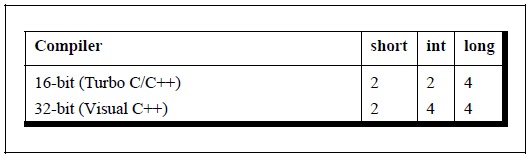
C offers a variation of the integer data type that provides what are called short and long integer values. The intention of providing these variations is to provide integers with different ranges wherever possible. Though not a rule, short and long integers would usually occupy two and four bytes respectively. Each compiler can decide appropriate sizes depending on the operating system and hardware for which it is being written, subject to the following rules:

(a)shorts are at least 2 bytes big
(b)longs are at least 4 bytes big
(c)shorts are never bigger than ints
(d)ints are never bigger than longs
Figure 6.1 shows the sizes of different integers based upon the OS used.


long variables which hold long integers are declared using the keyword long, as in,
long int i ;
long int abc ;
long integers cause the program to run a bit slower, but the range of values that we can use is expanded tremendously. The value of a long integer typically can vary from -2147483648 to +2147483647. More than this you should not need unless you are taking a world census.
If there are such things as longs, symmetry requires shorts as well—integers that need less space in memory and thus help speed up program execution. short integer variables are declared as,
short int j ;
short int height ;
C allows the abbreviation of short int to short and of long int to long. So the declarations made above can be written as,
long i ;
long abc ;
short j ;
short height ;
Naturally, most C programmers prefer this short-cut.
Sometimes we come across situations where the constant is small enough to be an int, but still we want to give it as much storage as a long. In such cases we add the suffix ‘L’ or ‘l’ at the end of the number, as in 23L.

C programming Functions & Pointers Summary

(a) To avoid repetition of code and bulky programs functionally related statements are isolated into a function.

(b) Function declaration specifies what is the return type of the function and the types of parameters it accepts.

 
(c) Function definition defines the body of the function.

(d) Variables declared in a function are not available to other functions in a program. So, there won’t be any clash even if we give same name to the variables declared in different functions.

(e) Pointers are variables which hold addresses of other variables.

(f) A function can be called either by value or by reference.

(g) Pointers can be used to make a function return more than one value simultaneously.

(h) Recursion is difficult to understand, but in some cases offer a better solution than loops.

(i) Adding too many functions and calling them frequently may slow down the program execution.

Adding Functions to the Library in C programming

Most of the times we either use the functions present in the standard library or we define our own functions and use them. Can we not add our functions to the standard library? And would it make any sense in doing so? We can add user-defined functions to the library. It makes sense in doing so as the functions that are to be added to the library are first compiled and then added. When we use these functions (by calling them) we save on their compilation time as they are available in the library in the compiled form.

Let us now see how to add user-defined functions to the library. Different compilers provide different utilities to add/delete/modify functions in the standard library. For example, Turbo C/C++
compilers provide a utility called ‘tlib.exe’ (Turbo Librarian). Let us use this utility to add a function factorial( ) to the library.
Given below are the steps to do so:

(a) Write the function definition of factorial( ) in some file, say ‘fact.c’.
int factorial ( int num )
{
int i, f = 1 ;
for ( i = 1 ; i <= num ; i++ )
f = f * i ;
return ( f ) ;
}
(b) Compile the ‘fact.c’ file using Alt F9. A new file called ‘fact.obj’ would get created containing the compiled code in machine language.

(c) Add the function to the library by issuing the command
C:\>tlib math.lib + c:\fact.obj
Here, ‘math.lib’ is a library filename, + is a switch, which means we want to add new function to library and ‘c:\fact.obj’ is the path of the ‘.obj’ file.

(d) Declare the prototype of the factorial( ) function in the header file, say ‘fact.h’. This file should be included while calling the function.

(e) To use the function present inside the library, create a program as shown below:
#include "c:\\fact.h"
main( )
{
int f ;
f = factorial ( 5 ) ;
printf ( "%d", f ) ;
}

(f) Compile and execute the program using Ctrl F9.

If we wish we can delete the existing functions present in the library using the minus ( - ) switch.
Instead of modifying the existing libraries we can create our own library. Let’s see how to do this. Let us assume that we wish to create a library containing the functions factorial( ), prime( ) and fibonacci( ). As their names suggest, factorial( ) calculates and returns the factorial value of the integer passed to it, prime( ) reports whether the number passed to it is a prime number or not and fibonacci( ) prints the first n terms of the Fibonacci series, where n is the number passed to it. Here are the steps that need to be carried out to create this library. Note that these steps are specific to Turbo C/C++ compiler and would vary for other compilers.

(a) Define the functions factorial( ), prime( ) and fibonacci( ) in a file, say ‘myfuncs.c’. Do not define main( ) in this file.

(b) Create a file ‘myfuncs.h’ and declare the prototypes of factorial( ), prime( ) and fibonacci( ) in it as shown below:
int factorial ( int ) ;
int prime ( int ) ;
void fibonacci ( int ) ;

(c) From the Options menu select the menu-item ‘Application’. From the dialog that pops us select the option ‘Library’. Select OK.
200


(d) Compile the program using Alt F9. This would create the library file called ‘myfuncs.lib’.
That’s it. The library now stands created. Now we have to use the functions defined in this library. Here is how it can be done.

(a) Create a file, say ‘sample.c’ and type the following code in it.
#include "myfuncs.h"
main( )
{
int f, result ;
f = factorial ( 5 ) ;
result = prime ( 13 ) ;
fibonacci ( 6 ) ;
printf ( "\n%d %d", f, result ) ;
}
Note that the file ‘myfuncs.h’ should be in the same directory as the file ‘sample.c’. If not, then while including ‘myfuncs.h’ mention the appropriate path.

(b)Go to the ‘Project’ menu and select ‘Open Project…’ option. On doing so a dialog would pop up. Give the name of the project, say ‘sample.prj’ and select OK.

(c)From the ‘Project’ menu select ‘Add Item’. On doing so a file dialog would appear. Select the file ‘sample.c’ and then select ‘Add’. Also add the file ‘myfuncs.lib’ in the same manner. Finally select ‘Done’.

(d) Compile and execute the project using Ctrl F9

Recursion and Stack in C programming

There are different ways in which data can be organized. For example, if you are to store five numbers then we can store them in five different variables, an array, a linked list, a binary tree, etc. All these different ways of organizing the data are known as data structures. The compiler uses one such data structure called stack for implementing normal as well as recursive function calls.
A stack is a Last In First Out (LIFO) data structure. This means that the last item to get stored on the stack (often called Push operation) is the first one to get out of it (often called as Pop operation). You can compare this to the stack of plates in a cafeteria—the last plate that goes on the stack is the first one to get out of it. Now let us see how the stack works in case of the following program.
main( )
{
int a = 5, b = 2, c ;
c = add ( a, b ) ;
printf ( "sum = %d", c ) ;
}
add ( int i, int j )
{
int sum ;
sum = i + j ;
return sum ;
}
In this program before transferring the execution control to the function fun( ) the values of parameters a and b are pushed onto the stack. Following this the address of the statement printf( ) is pushed on the stack and the control is transferred to fun( ). It is necessary to push this address on the stack. In fun( ) the values of a and b that were pushed on the stack are referred as i and j. In fun( ) the local variable sum gets pushed on the stack. When value of sum is returned sum is popped up from the stack. Next the address of the statement where the control should be returned is popped up from the stack. Using this address the control returns to the printf( ) statement in main( ). Before execution of printf( ) begins the two integers that were earlier pushed on the stack are now popped off.

How the values are being pushed and popped even though we didn’t write any code to do so? Simple—the compiler onencountering the function call would generate code to push parameters and the address. Similarly, it would generate code to clear the stack when the control returns back from fun( ). Figure 5.5 shows the contents of the stack at different stages of execution.


Note that in this program popping of sum and address is done by fun( ), whereas popping of the two integers is done by main( ). When it is done this way it is known as ‘CDecl Calling Convention’. There are other calling conventions as well where instead of main( ), fun( ) itself clears the two integers. The calling convention also decides whether the parameters being passed to the function are pushed on the stack in left-to-right or right-to-left order. The standard calling convention always uses the right-to-leftorder. Thus during the call to fun( ) firstly value of b is pushed to the stack, followed by the value of a.
The recursive calls are no different. Whenever we make a recursive call the parameters and the return address gets pushed on the stack. The stack gets unwound when the control returns from the called function. Thus during every recursive function call we are working with a fresh set of parameters.

Also, note that while writing recursive functions you must have an if statement somewhere in the recursive function to force the function to return without recursive call being executed. If you don’t do this and you call the function, you will fall in an indefinite loop, and the stack will keep on getting filled with parameters and the return address each time there is a call. Soon the stack would become full and you would get a run-time error indicating that the stack has become full. This is a very common error while writing recursive functions. My advice is to use printf( ) statement liberally during the development of recursive function, so that you can watch what is going on and can abort execution if you see that you have made a mistake.

Recursion in C programming

In C, it is possible for the functions to call themselves. A function is called ‘recursive’ if a statement within the body of a function calls the same function. Sometimes called ‘circular definition’, recursion is thus the process of defining something in terms of itself.

Let us now see a simple example of recursion. Suppose we want to calculate the factorial value of an integer. As we know, thefactorial of a number is the product of all the integers between 1 and that number. For example, 4 factorial is 4 * 3 * 2 * 1. This can also be expressed as 4! = 4 * 3! where ‘!’ stands for factorial. Thus factorial of a number can be expressed in the form of itself. Hence this can be programmed using recursion. However, before we try to write a recursive function for calculating factorial let us take a look at the non-recursive function for calculating the factorial value of an integer.
main( )
{
int a, fact ;
printf ( "\nEnter any number " ) ;
scanf ( "%d", &a ) ;
fact = factorial ( a ) ;
printf ( "Factorial value = %d", fact ) ;
}
factorial ( int x )
{
int f = 1, i ;
for ( i = x ; i >= 1 ; i-- )
f = f * i ;
return ( f ) ;
}
And here is the output...
Enter any number 3
Factorial value = 6
Work through the above program carefully, till you understand the logic of the program properly. Recursive factorial function can be understood only if you are thorough with the above logic.

Following is the recursive version of the function to calculate the factorial value.
main( )
{
int a, fact ;
printf ( "\nEnter any number " ) ;
scanf ( "%d", &a ) ;
fact = rec ( a ) ;
printf ( "Factorial value = %d", fact ) ;
}
rec ( int x )
{
int f ;
if ( x == 1 )
return ( 1 ) ;
else
f = x * rec ( x - 1 ) ;
return ( f ) ;
}
And here is the output for four runs of the program
Enter any number 1
Factorial value = 1
Enter any number 2
Factorial value = 2
Enter any number 3
Factorial value = 6
Enter any number 5
Factorial value = 120
Let us understand this recursive factorial function thoroughly. In the first run when the number entered through scanf( ) is 1, let us see what action does rec( ) take. The value of a (i.e. 1) is copied into x. Since x turns out to be 1 the condition if ( x == 1 ) is satisfied and hence 1 (which indeed is the value of 1 factorial) is returned through the return statement.

When the number entered through scanf( ) is 2, the ( x == 1 ) test fails, so we reach the statement,
f = x * rec ( x - 1 ) ;
And here is where we meet recursion. How do we handle the expression x * rec ( x - 1 )? We multiply x by rec ( x - 1 ). Since the current value of x is 2, it is same as saying that we must calculate the value (2 * rec ( 1 )). We know that the value returned by rec ( 1 ) is 1, so the expression reduces to (2 * 1), or simply 2. Thus the statement,
x * rec ( x - 1 ) ;
evaluates to 2, which is stored in the variable f, and is returned to main( ), where it is duly printed as
Factorial value = 2

Now perhaps you can see what would happen if the value of a is 3, 4, 5 and so on.

In case the value of a is 5, main( ) would call rec( ) with 5 as its actual argument, and rec( ) will send back the computed value. But before sending the computed value, rec( ) calls rec( ) and waits for a value to be returned. It is possible for the rec( ) that has just beenFactorial value = 6
Enter any number 5
Factorial value = 120

Let us understand this recursive factorial function thoroughly. In the first run when the number entered through scanf( ) is 1, let us see what action does rec( ) take. The value of a (i.e. 1) is copied into x. Since x turns out to be 1 the condition if ( x == 1 ) is satisfied and hence 1 (which indeed is the value of 1 factorial) is returned through the return statement.
When the number entered through scanf( ) is 2, the ( x == 1 ) test fails, so we reach the statement,
f = x * rec ( x - 1 ) ;
And here is where we meet recursion. How do we handle the expression x * rec ( x - 1 )? We multiply x by rec ( x - 1 ). Since the current value of x is 2, it is same as saying that we must calculate the value (2 * rec ( 1 )). We know that the value returned by rec ( 1 ) is 1, so the expression reduces to (2 * 1), or simply 2. Thus the statement,
x * rec ( x - 1 ) ;
evaluates to 2, which is stored in the variable f, and is returned to main( ), where it is duly printed as
Factorial value = 2

Now perhaps you can see what would happen if the value of a is 3, 4, 5 and so on.
In case the value of a is 5, main( ) would call rec( ) with 5 as its actual argument, and rec( ) will send back the computed value. But before sending the computed value, rec( ) calls rec( ) and waits for a value to be returned. It is possible for the rec( ) that has just beenhelp you keep track of how the control flows during successive recursive calls.


 Recursion may seem strange and complicated at first glance, but it is often the most direct way to code an algorithm, and once you are familiar with recursion, the clearest way of doing so.


Back to Function Calls : C Programming

Having had the first tryst with pointers let us now get back to what we had originally set out to learn—the two types of function calls—call by value and call by reference. Arguments can generally be passed to functions in one of the two ways:

(a) sending the values of the arguments
(b) sending the addresses of the arguments

In the first method the ‘value’ of each of the actual arguments in the calling function is copied into corresponding formal arguments of the called function. With this method the changes made to the formal arguments in the called function have no effect on the values of actual arguments in the calling function. The following program illustrates the ‘Call by Value’.
main( )
{
int a = 10, b = 20 ;
swapv ( a, b ) ;
printf ( "\na = %d b = %d", a, b ) ;
}
swapv ( int x, int y )
{
int t ;
t = x ;
x = y ;
y = t ;
printf ( "\nx = %d y = %d", x, y ) ;
}
The output of the above program would be:
x = 20 y = 10
a = 10 b = 20

Note that values of a and b remain unchanged even after exchanging the values of x and y.
In the second method (call by reference) the addresses of actual arguments in the calling function are copied into formal arguments of the called function. This means that using these addresses we would have an access to the actual arguments and hence we would be able to manipulate them. The following program illustrates this fact.
main( )
{
int a = 10, b = 20 ;
swapr ( &a, &b ) ;
printf ( "\na = %d b = %d", a, b ) ;
}
swapr( int *x, int *y )
{
int t ;
t = *x ;
*x = *y ;
*y = t ;
}
The output of the above program would be:
a = 20 b = 10

Note that this program manages to exchange the values of a and b using their addresses stored in x and y
Usually in C programming we make a call by value. This means that in general you cannot alter the actual arguments. But if desired, it can always be achieved through a call by reference.
Using a call by reference intelligently we can make a function return more than one value at a time, which is not possible ordinarily. This is shown in the program given below.
main( )
{
int radius ;
float area, perimeter ;
printf ( "\nEnter radius of a circle " ) ;
scanf ( "%d", &radius ) ;
areaperi ( radius, &area, &perimeter ) ;
printf ( "Area = %f", area ) ;
printf ( "\nPerimeter = %f", perimeter ) ;
}
areaperi ( int r, float *a, float *p )
{
*a = 3.14 * r * r ;
*p = 2 * 3.14 * r ;
}
And here is the output...
Enter radius of a circle 5
Area = 78.500000
Perimeter = 31.400000

Here, we are making a mixed call, in the sense, we are passing the value of radius but, addresses of area and perimeter. And since we are passing the addresses, any change that we make in values stored at addresses contained in the variables a and p, would make
the change effective in main( ). That is why when the control returns from the function areaperi( ) we are able to output the values of area and perimeter.
Thus, we have been able to indirectly return two values from a called function, and hence, have overcome the limitation of the return statement, which can return only one value from a function at a time.